🖳 Accessing the Desk API
For Franka robots, control happens via the Franka Control Interface (FCI), which has to be enabled through the Franka UI in the robot’s web interface. The Franka UI also provides methods for locking and unlocking the brakes, setting the execution mode, and executing the safety self-test. However, sometimes you may want to access these methods programmatically, e.g., for automatically unlocking the brakes before starting a motion, or automatically executing the self-test after 24h of continuous execution.
For that reason, franky provides two classes that allow you to programmatically access these features: Desk (for the current Franka Desk API v1) and DeskWebSession (for older firmwares).
Note that DeskWebSession directly accesses the web interface API, which is not officially supported or documented by Franka.
Hence, use this feature at your own risk.
A typical automated workflow could look like this:
import franky

with franky.Desk("10.90.90.1", "username", "password") as desk:
  # First take control
  try:
    # Try taking control. The session currently holding control has to release it in order
    # for this session to gain control. In the web interface, a notification will show
    # prompting the user to release control. If the other session is another
    # franky.Desk session, then the `release_control` method can be called on the other
    # session to release control.
    desk.take_control(wait_timeout=10.0)
  except franky.TakeControlTimeoutError:
    # If nothing happens for 10s, we try to take control forcefully. This is particularly
    # useful if the session holding control is dead. Taking control by force requires the
    # user to manually push the blue button close to the robot's wrist.
    desk.take_control(wait_timeout=30.0, force=True)

  # Unlock the brakes
  desk.unlock_brakes()

  # Enable the FCI
  desk.enable_fci()

  # Create a franky.Robot instance and do whatever you want
  ...

  # Disable the FCI
  desk.disable_fci()

  # Lock brakes
  desk.lock_brakes()
Control-token persistence is opt in. Passing token_storage=True to DeskWebSession
or Desk stores the SPoC/control token under $XDG_RUNTIME_DIR/franky/control-tokens/
(falling back to $XDG_STATE_HOME/franky/control-tokens/, then
~/.local/state/franky/control-tokens/), one owner-only file per robot/user pair. This
lets a later process retake the same control token after a crash. You can pass a path
instead of True to use a different storage directory.
In case you are running the robot for longer than 24h you will have noticed that you have to do a safety self-test every 24h.
Desk allows to automate this task as well:
import time
import franky

with franky.Desk("10.90.90.1", "username", "password") as desk:
  # Execute self-test if the time until self-test is less than 5 minutes.
  if desk.system_status["safety"]["timeToTd2"] < 300:
    desk.disable_fci()
    desk.lock_brakes()
    time.sleep(1.0)

    desk.execute_self_test()

    desk.unlock_brakes()
    desk.enable_fci()
    time.sleep(1.0)

    # Recreate your franky.Robot instance as the FCI has been disabled and re-enabled
    ...
desk.system_status contains more information than just the time until self-test, such as the current execution mode, whether the brakes are locked, whether the FCI is enabled, and more.
If you want to call other API functions, you can use the send_api_request and send_control_api_request methods available on both Desk and DeskWebSession.
See desk.py for an example of how to use these methods.
Reading Pilot Button Events
Both Desk and DeskWebSession can also read button events.
This is exposed via poll_buttons, which waits for up to timeout seconds for the next websocket message and then returns all button events that are currently available.
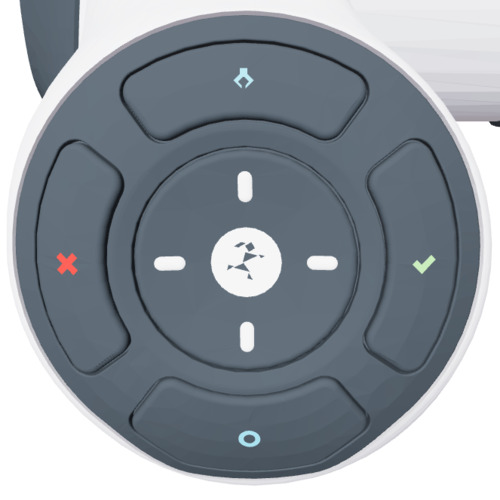
Buttons are represented by the PilotButton enum.
Note that the top button is not accessible, and the center directional keys will not work while FCI is activated.
Each event is returned as a PilotButtonEvent containing the button and whether it was pressed or released.
import franky

with franky.Desk("10.90.90.1", "username", "password") as desk:
  while True:
    for event in desk.poll_buttons(timeout=1.0):
      print(event.button, event.pressed)